The Box
You’ll often hear us saying “requests in the box” or “send it back to the box.” When we say “the box,” we’re referring to the Techrangers Homepage in the ServiceNow ITIL Portal. Instructional Designers who represent our “customers” (the online faculty at UCF) create requests on their behalf using the Service Portal, and we use the ITIL Portal to fulfill them. (ITIL stands for “IT Infrastructure Library,” but you don’t really need to know that to use it.)
You should see the Techrangers Dashboard when you first load up the ITIL Portal, but if you don’t, click the “All” tab in the upper-left corner of the screen and then “Homepage” under “Self-Service.” Then select Techrangers Homepage from the drop-down list at the top of the page. If you still can’t see it, you may need to search for it via the Dashboards searchbar.
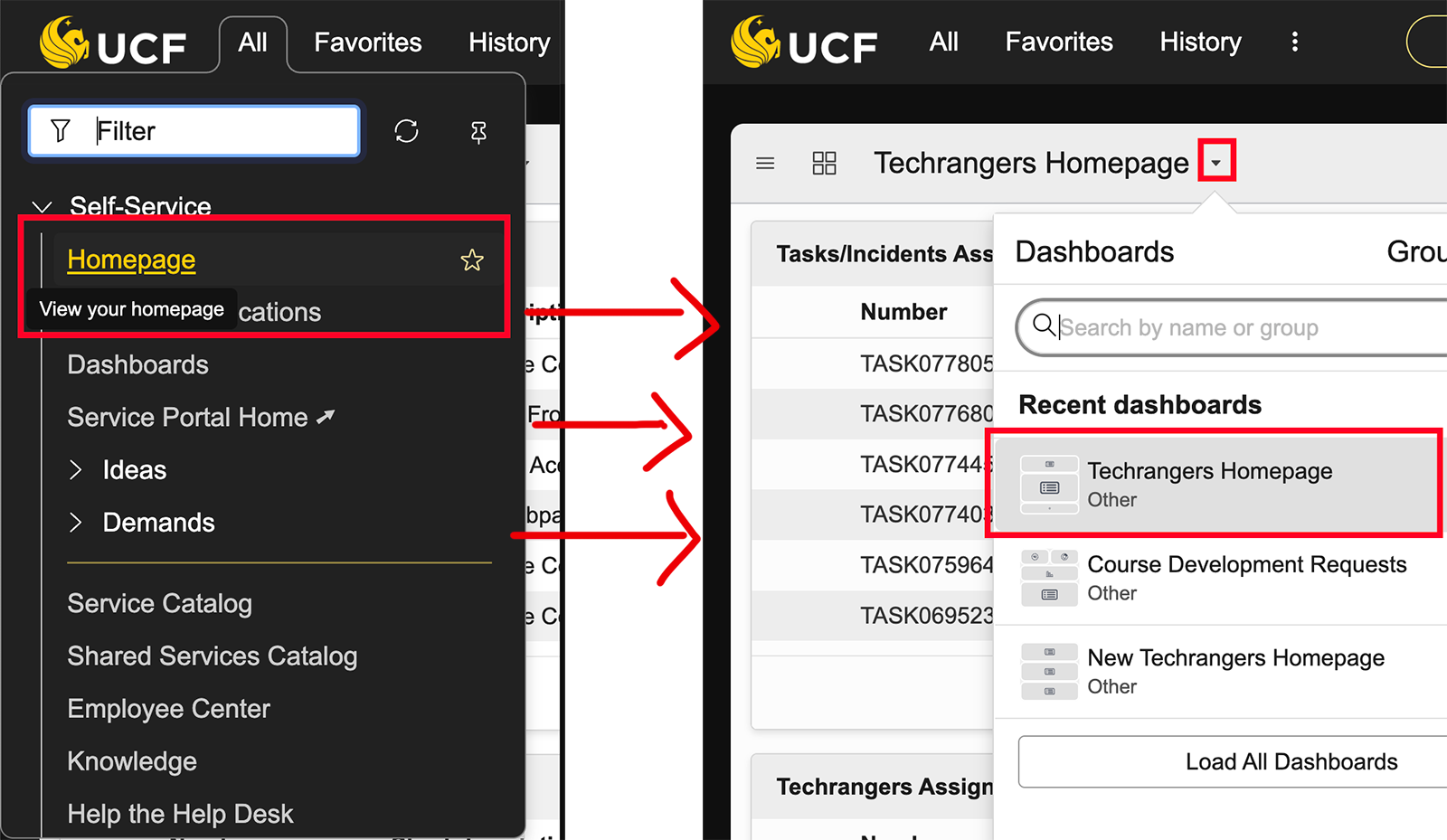
Make sure you are on “Techrangers Homepage” and not “New Techrangers Homepage” as the latter does not show certain types of tickets. You can see other available dashboards by clicking on “Load All Dashboards,” but there’s generally no reason to (other than just to be nosy).
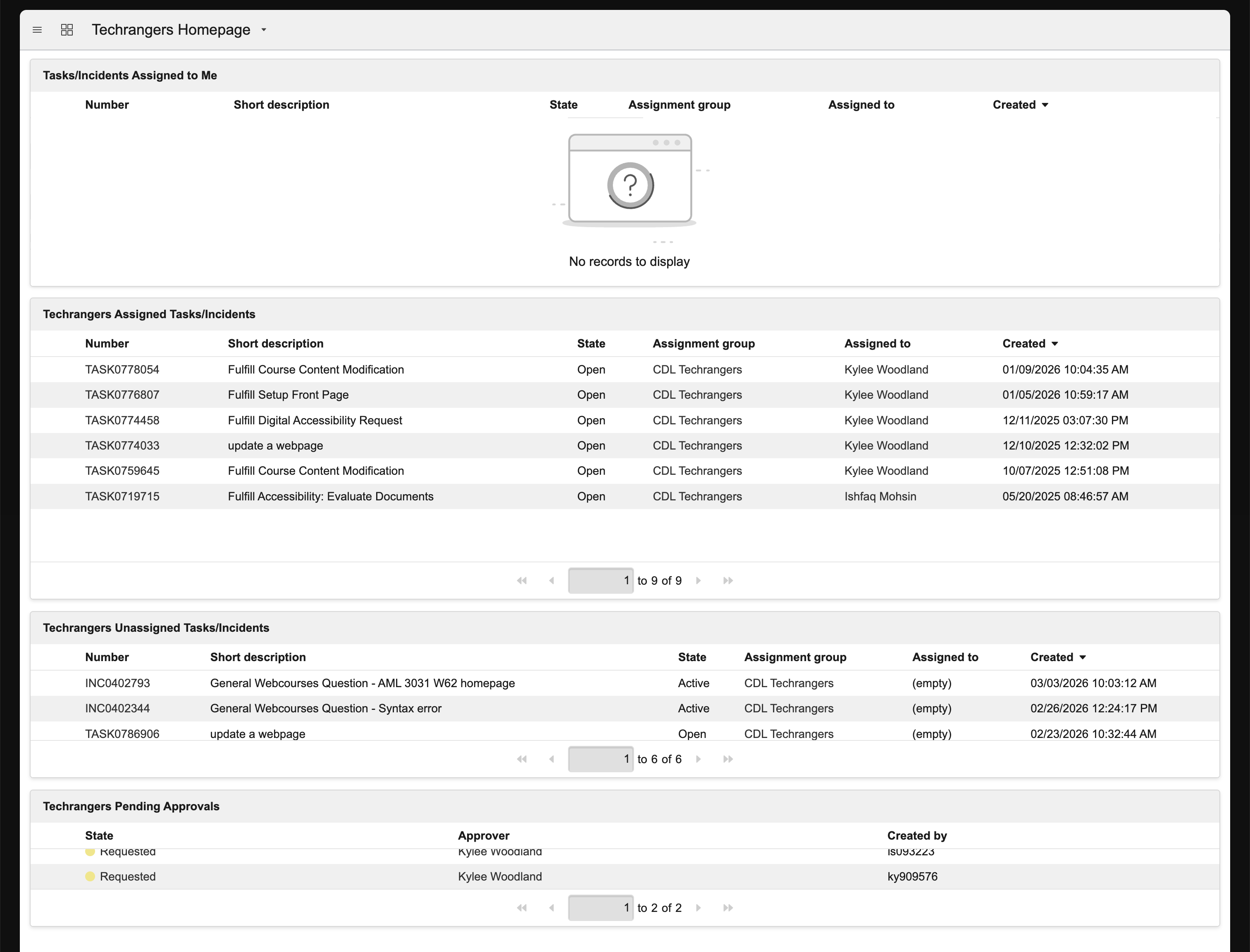
Now that you are viewing the dashboard, let’s go over its parts.
Ticket Prefixes
Most of the tickets we work on have the TASK prefix. This is just the system by which ServiceNow labels different kinds of tickets. A TASK is actually a sub-ticket of the general Request Item (RIT). Sometimes, we get Incidents (INC). Whatever tickets are present in the Techrangers Homepage are assigned to the Techrangers group and must be worked on.
Tasks/Incidents Assigned to Me
Anything that is currently assigned to you. In general, there should only be one ticket here listed at a time, and only if 1) it’s your ticket day and you are actively working on that ticket or 2) you have been specifically told to keep the ticket assigned to you. Otherwise, there should be nothing here!
Techrangers Assigned Tasks/Incidents
These are currently assigned to your fellow Techrangers. Don’t worry about these, but it’s nice to know what your coworkers are working on, especially if they’re asking for help on a ticket.
Techrangers Unassigned Tasks/Incidents
This is really what we mean when we refer to “the box.” These are requests that are not currently assigned to anyone and are up for grabs by any Techranger that is currently working on requests. If it’s your ticket day and you see something here that you don’t know how to do, don’t ignore it! Ask for help in the #tickets channel on Slack. (Before doing so, however, search the handbook and look through the pinned messages in the #tickets channel in case your question is answered there.)
Techrangers Pending Approvals
These are requests that have been completed, but require another Techranger to review the work and validate that it has been completed correctly. We often refer to this process as “QAing the request.” When you look at this section, you will see your name listed as the “Approver” – ignore this. It says that for everyone. Note that it says “Kylee Woodland” as the Approver because Kylee is the one currently logged in. It does not mean you’re assigned to the ticket!
You will be manually told that you are “QA Certified” once you have enough experience doing requests. When you are QA Certified, part of your job on your ticket day will be to go through the tickets in this section, make sure they were completed properly, and then approve them.
Types of Requests
- Course Development Request: This is the primary ticket Techrangers handle in ServiceNow. They are automatically assigned to us upon creation. They start with the TASK prefix.
- Website Update: This type of ticket is part of the “CDL Web & Communication Request” instead of our usual “Course Development Request.” We only receive these requests for websites we help manage, such as cdl.ucf.edu or topr.online.ucf.edu.
- General Webcourses Question: These start with INC and are usually direct questions that faculty send to Webcourses@UCF Support. Support will sometimes send these tickets our way when it’s something that falls under the course development umbrella, such as fixing a Canvas page layout or updating an image map. Because this kind of ticket can be so variable, pay extra close attention to what the notes and comments are asking for and then find the appropriate handbook page on how to complete the task.